HTTP vs HTTPS: Understanding Secure Communication
Ever wondered what the difference between HTTP and HTTPS is when you’re browsing the web? You might have seen the padlock symbol in your browser’s address bar or noticed URLs starting with "https://"—but do you really know what it means? Let’s break it down and discover why HTTPS is so important for online security!
What is HTTP?
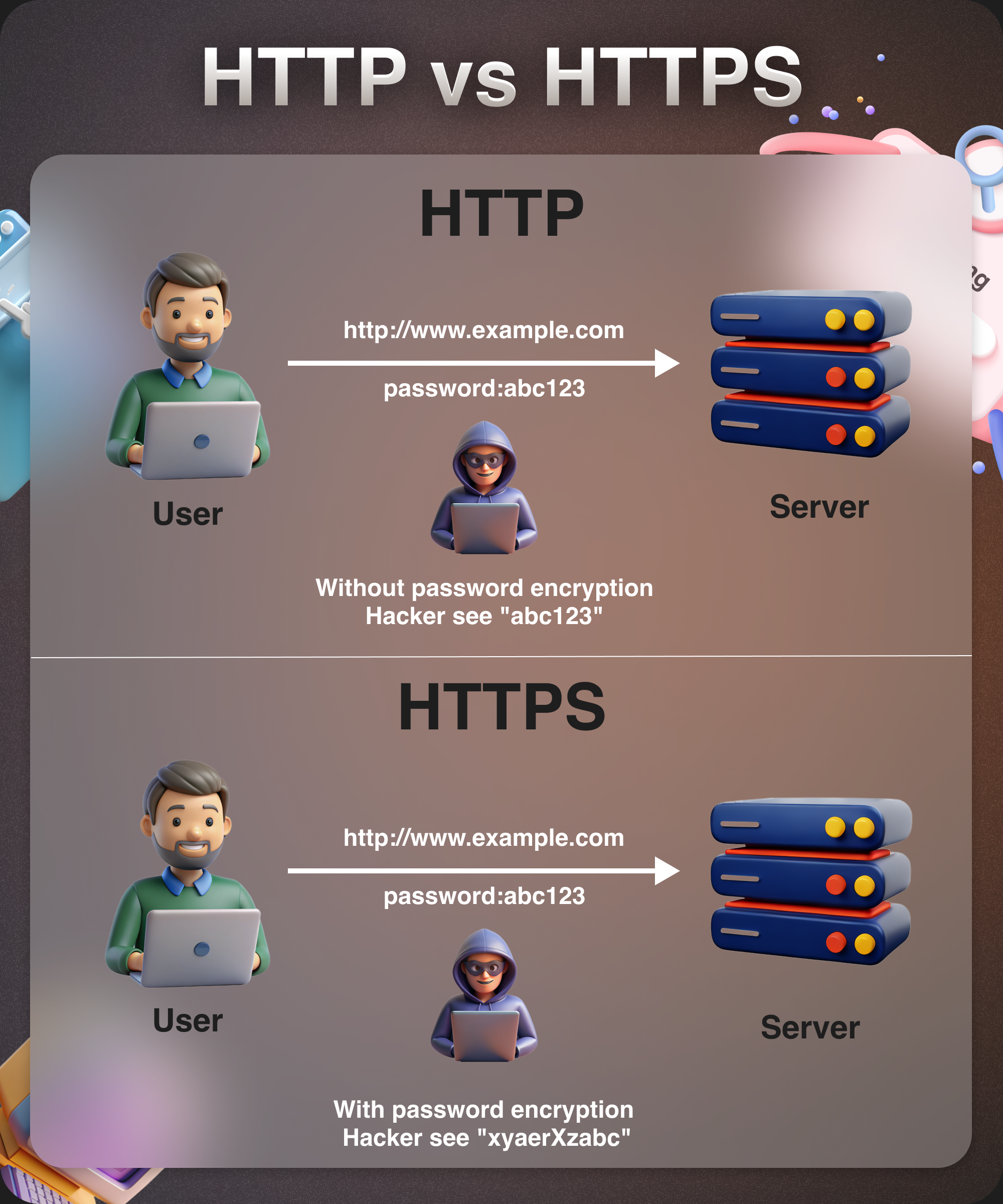
HTTP stands for Hypertext Transfer Protocol, and it's been around for decades. It's essentially the protocol or set of rules that allows browsers to communicate with websites and transfer data back and forth. When you visit a website that uses HTTP, the information you exchange—like personal details or login credentials—is not encrypted. This means it’s transmitted in plain text and can be intercepted by anyone with the right tools (like hackers or malicious third parties). Not exactly ideal for your privacy or security, right?
Enter HTTPS: The Secure Version of HTTP
Now, let’s talk about HTTPS, which stands for Hypertext Transfer Protocol Secure. As the name suggests, HTTPS is a more secure version of HTTP. It adds a layer of encryption using SSL (Secure Socket Layer) or TLS (Transport Layer Security) protocols. This means that the data exchanged between your browser and the website is encrypted and scrambled, making it almost impossible for hackers to intercept or read.
So, what does this look like in practice? When you visit a website using HTTPS, the connection between your browser and the server is protected, keeping sensitive data like passwords, credit card numbers, and personal information safe from potential attackers.
Why Should You Care About HTTPS?
1. Security:
The main reason to care about HTTPS is security. Every time you send data over the internet, you’re at risk of interception if the site doesn’t use HTTPS. Whether you’re logging into your email, making a purchase, or just browsing, HTTPS ensures that your data is safe from cybercriminals.
2. Search Engine Ranking:
Did you know that Google and other search engines favor websites that use HTTPS? That’s right! HTTPS is a ranking factor, meaning Google gives higher visibility to websites that are secure. This is great news for website owners, but also reassuring for users—because it means that the sites you encounter are more likely to be trustworthy and secure.
Real-World Examples of HTTPS Sites
So, where can you find HTTPS in action? Almost every site that requires you to submit personal data uses HTTPS, including major sites like:
Amazon (https://www.amazon.com): When you shop online, you’re submitting sensitive information like your address and credit card number. HTTPS keeps this data safe.
Google (https://www.google.com): When you log into your Gmail or search on Google, HTTPS ensures your login credentials and search history remain private.
PayPal (https://www.paypal.com): When making online transactions, you want to be sure that your payment details are secure. PayPal uses HTTPS to encrypt your payment info.
How Can You Tell If a Website Is Using HTTPS?
It’s simple! When you visit a secure website, you’ll see the padlock symbol next to the URL in your browser’s address bar. You’ll also notice that the URL starts with “https://” rather than just “http://.” This is your clear indication that the site is encrypted and secure.
The Downsides of HTTP
While HTTP still works for basic browsing, it’s no longer considered safe for sites that handle personal or sensitive data. If you use HTTP on your site, you’re essentially leaving your users vulnerable to attacks, data theft, and privacy violations. In fact, many modern browsers (like Chrome and Firefox) will show a "Not Secure" warning next to any HTTP website, making it clear to users that their connection is not protected.
HTTPS Is a Must for Modern Websites
In today’s world, HTTPS is no longer optional for websites—it's a necessity. Whether you’re an e-commerce store, a social media platform, or even a simple blog, HTTPS protects both your users and your brand. The move from HTTP to HTTPS is a crucial step toward building trust, ensuring privacy, and securing your online presence.